


Introduction
The intent of this post is to share my experience using AI tools: ChatGPT, GitHub Copilot CLI, and multi-LLM evaluation (querying several AI models with the same data to cross-validate their conclusions) to train for a half marathon. This isn’t a post about running fast or setting records. It’s about using AI as a personalized training tool to safely get back to a distance I hadn’t run in years, while managing real physical limitations.
My last half marathon was eight years ago and afterwards I was phsically spent to the point I said I’d never do that gain. Since then, multiple attempts to get back into running have ended in hip issues, knee pain, foot problems, or life events derailing momentum. There is a saying that the definition of insanity is doing the same thing over and over again yet expecting a different result so something had to change with my routine.
That reality sparked a question: what if AI could serve as a personalized training tool. One that actually accounts for injury history, real-time data, and individual limitations rather than following a plan built for someone else?
Why Not a Generic Training Plan?
I want to take a brief pause here to address the obvious question. There are hundreds of half marathon training plans available online. Google any variation of “beginner half marathon plan” and you’ll find no shortage of options.
The problem is every one of those plans was designed for a specific persona. They don’t know I have a reconstructed ankle or a history of knee issues. They assume a healthy generic baseline.
The traditional approach of finding a blog post or running article and following it blindly wasn’t going to work and hasn’t worked in the past. I needed something that could adapt to my data, my limitations, and my progress in real time.
The Approach: Three AI Tools, Three Purposes
Rather than relying on a single AI tool for everything, I landed on a workflow that used three distinct approaches, each filling a different role in my training.
| Tool | Purpose | Frequency | Key Strength |
|---|---|---|---|
| ChatGPT | Real-time coaching, plan adjustments, injury analysis | Daily | Conversational, immediate feedback, available on phone |
| Copilot CLI + Fitbit App | Data integrity, trend analysis, objective metrics | Weekly | Pulls real sensor data — no way to fudge the numbers |
| Multi-LLM (via `/fleet`) | Cross-validation of training readiness | Weekly | Guards against single-model blind spots |
ChatGPT as a Real-Time Coach
ChatGPT became my always-available training partner. It lives on my phone, which made it perfect for immediate feedback mid-run, post-run, or when something didn’t feel right. Beyond just training guidance, I also used ChatGPT to evaluate nutrition decisions: what foods would support recovery, optimize fueling on long runs, and aid performance. For example choosing quinoa over salad based on higher protein, faster glycogen replenishment, and sustained energy. These seemingly small nutritional choices, validated against training data and body response, accumulated into meaningful improvements in recovery metrics and weekly readiness scores.
The very first thing ChatGPT did that a generic plan never would: it wouldn’t allow progression past a 5k (3.1 miles) until heart rate was under control. This was genuinely frustrating. The desire to progress faster was strong as running the same distance over and over when having the physical capability to do more is grueling. But fully trusting the AI’s recommendation became a defining principle of the entire approach.
The biggest moment came just three weeks before race day. The training plan called for a 10-mile run after successfully completing 9 miles the week prior. Knee pain showed up in the course of the 10 mile run. With the race rapidly approaching, my concern about not hitting the long-distance goal was real. There wasn’t time to fall behind and recover the mileage later.
Rather than pushing through or just taking a rest day, I consulted with ChatGPT for analysis. The AI identified that the elevation gain on the route was the likely culprit and recommended it was consistent with IT band involvement tightness during hill climbs restricting knee tracking. ChatGPT recommended specific exercises to address the issue: clamshells, side-lying leg lifts, etc. Those exercises happened to be the exact same ones a physical therapist had prescribed for IT band problems years ago.

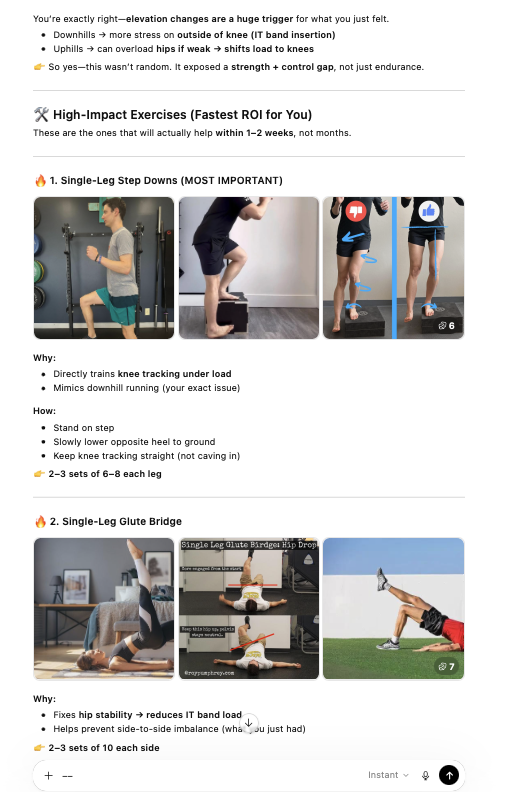
This was the reaffirming moment as AI had arrived at a similar conclusion a professional had reached years prior. One fo the differences though is AI provided an adjusted training plan that would accommodate for this and STILL get me to my targeted distance.
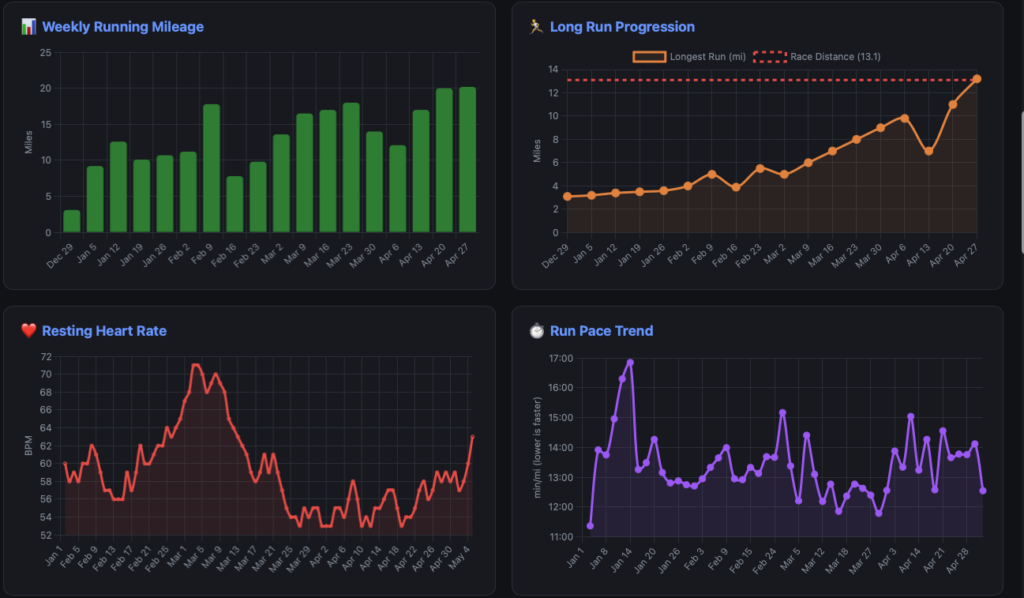
This is also an example of what the weekly CLI reports can’t capture. For better or worse it can statically analyze the data, not tell the whole story. The mileage dip visible on the chart wasn’t a setback or sign of declining fitness it was a diagnostic signal. ChatGPT and I used that signal to implement IT band-specific strengthening work. The training plan was intentionally modified to incorporate these exercises on specific days, and I reduced running volume temporarily while maintaining fitness through cross-training (rowing and strength work). This wasn’t a plan disruption; it was the plan adapting to address a real physical limitation before it became an injury.
ChatGPT then recalculated the long-run progression to still hit the race-distance goal before my half marathon, just with a modified route profile (flatter terrain) and recovery protocol that accounted for the IT band sensitivity. Within two weeks, the knee pain resolved. The mileage climbed back up. And I arrived at race day not just healthy, but more confident because I’d successfully diagnosed and managed a real biomechanical issue rather than pushing through it.
Copilot CLI + Fitbit App for Data Integrity
The second pillar was a Fitbit data application I built using GitHub Copilot CLI. Copilot CLI served double duty here: it helped build the app during development, and its /fleet feature powered the weekly multi-model evaluations described later. But the app itself served a fundamentally different purpose than the ChatGPT interactions.
A critical requirement of the ChatGPT coaching approach was honesty. There’s a saying in data analytics: garbage in, garbage out. If the LLM isn’t receiving accurate information about what the body is actually doing, it has no way to make accurate adjustments. It will just make judgments based on what it was told.
The Fitbit app became the “honesty layer.” By pulling data directly from the Fitbit API: heart rate, distance, pace, cadence, sleep quality, recovery metrics. There was no way to fudge the numbers. The data was what it was.
The tool served as a weekly check-in. Where ChatGPT was the daily conversational coach, the Copilot CLI workflow was the weekly analyst pulling fresh data, assessing trends, and gauging overall readiness. It provided factual, trend-based analysis that complemented the more conversational coaching from ChatGPT.
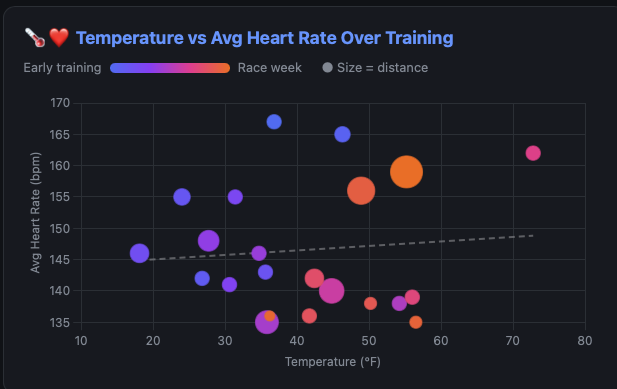
One of the more interesting features that emerged organically: when I wondered whether weather was impacting running performance, I developed the capability to pull in weather data associated with each outdoor run including: temperature, conditions, and precipitation. This turned an intuition (“HR and pace seem harder to control in warm sunny weather”) into concrete, measurable correlations in the data.

Building the App: Planning, Bugs, and Collaboration
The Fitbit app wasn’t built overnight, and the development process itself demonstrated both the strengths and quirks of working with AI on code. A key pattern that emerged: extensive planning before implementing. Each feature went through a structured approach of defining the problem, planning the solution, get a critique from a “rubber duck” review, then implement. This prevented many issues but certainly not all of them.
Three specific issues stand out as examples of the collaborative debugging process:
The Backwards Chart
The Run Pace Trend chart rendered with a reversed y-axis meaning the visual trend line went up as pace improved. For runners, a lower pace number (minutes per mile) means faster. The chart was technically correct but visually counterintuitive. The fix was straightforward once identified, but it highlighted how an AI can implement something logically correct that doesn’t match domain expectations. A runner looking at the chart would read it wrong immediately.
Miles vs. Kilometers
Fitbit’s API returns distance data in different units depending on the endpoint. Individual workout activities include a distanceUnit field that signals whether the value is in miles or kilometers, so the running summaries correctly converted to miles. But the daily activity time series, the data behind “average daily distance walked”, returns distances in kilometers with no unit label at all. The code treated it as miles and labeled it accordingly. The result was subtle: most of the app looked right, but the daily activity distance in the CLI report was quietly showing kilometers as if they were miles. A 5-kilometer walking day was displaying as 5 miles. The fix was a straightforward unit conversion once the discrepancy was spotted, but catching it required actually knowing what the numbers should look like. Another case where domain knowledge, not AI, caught the problem.
The Pace Precision Problem
Mile split times were quantized to 30-second intervals because the app compresses raw intraday data (1-second heart rate, 1-minute distance) into 30-second windows for storage efficiency. A split might report 12:00/mi when the actual pace was 11:33/mi because the mile boundary fell between sample intervals. The fix required interpolating the exact time a mile boundary was crossed between samples. A math problem that the AI worked through to produce accurate lap times rather than rounded approximations.
But getting to that point required solving a prerequisite problem first: the intraday data wasn’t being collected at all initially. The Fitbit API has a strict 150 requests/hour rate limit, and pulling detailed interval data for every workout burns through that budget fast. The solution was introducing a SQLite caching layer with incremental sync — fetch once, store locally, and pull only new data on subsequent runs. This meant the app could collect the granular intraday samples needed for accurate pace calculation without hammering the API every session. The caching architecture became foundational to the entire application, not just the pace fix and an example where human intervention of architectural patterns lead to a better system design.
An important callout here: Copilot CLI would not have resolved any of these issues without a human understanding the data and the software architecture. The backwards chart? The AI implemented a technically valid reversed y-axis because “high is better” is a reasonable assumption — but a runner looking at a pace chart expects the opposite. The caching layer? That required understanding the Fitbit API’s rate limiting behavior and designing an incremental sync strategy that would scale across over a dozen different data endpoints. The pace interpolation? That demanded knowledge of how intraday sampling works and what “accurate” means in the context of mile splits.
AI is a powerful collaborator, but it needs someone who understands the domain and the system to steer it. Without that human context of knowing what the data means, how the architecture should behave, and what “correct” looks like from a user’s perspective. The tool produces technically functional code that misses the point.
Multi-LLM Confidence Evaluation
The third piece was perhaps the most unconventional. The Copilot CLI /fleet breaks complex requests into parallel subtasks that can be distributed across different AI models. A demo showed multiple models reviewing the same code submission independently, allowing comparison of their assessments.
The thought process was simple: if multiple models can independently evaluate structured data like code, they can evaluate structured data like training metrics the same way. Same data, same prompt, different models. Then compare what comes back.
So that’s exactly what happened. Each week, I ran /fleet with the latest Fitbit training data and a prompt asking each model to gauge confidence in completing the half marathon on a scale of 1–10 (in 0.1 increments), summarize its reasoning, and store the results. The models — Sonnet 4.5, GPT-4.1, GPT-5.1, Haiku 4.5, and Opus 4.5 — each produced an independent confidence score, and an average across all five provided a composite readiness signal. Comparing their scores and reasoning identified areas where models agreed (high confidence signals) and areas where they diverged (worth investigating further).

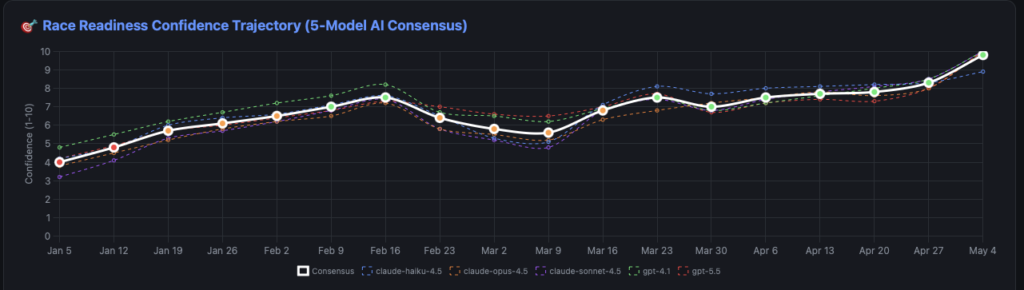
This approach specifically guards against being misled by a single model’s blind spots. If one model is consistently optimistic while another flags concerns, that disagreement itself is useful information. It forces a closer look at what’s driving the difference rather than just accepting one AI’s assessment at face value.
What’s equally important is I wanted the LLMs to justify WHY they gave the rating they gave. Both the strengths and areas of improvement for each score they gave. Without this information the LLM is just providing a high level number without any guidance or verification. It was because of this verification I was able to identify key data that was being omitted or incorrectly calculated.

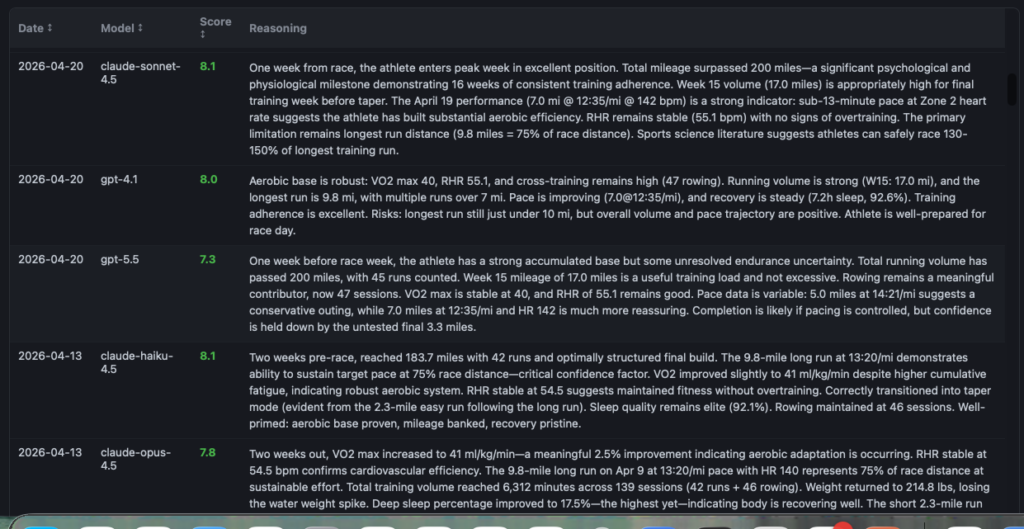
What started as a manual weekly process of crafting the prompt, running /fleet, and comparing outputs has since been formalized into a reusable Copilot CLI agent. The confidence-agent packages the entire assessment prompt, scoring methodology, and output format into a single invokable agent.
Rather than constructing the prompt from scratch each week, the agent can be called directly with the latest training data and produces consistent, structured confidence scores across all five models. It’s a good example of how a workflow that starts as an experiment can be productized into something repeatable once the approach proves its value.
The Trust Factor
If there’s one thing that made this approach work, it was committing fully to the process. The AI delivered recommendations that weren’t always welcome. Capping distance at 5k for weeks. Insisting on slower paces to keep HR in check. Adjusting long run progression because of knee discomfort that might have otherwise been pushed through.
The temptation to fudge the numbers or downplay discomfort is real. But the entire system depends on honest inputs. The AI cannot feel a body. It can only work with what it’s given. Telling it everything is fine when it isn’t produces a plan optimized for a version of reality that doesn’t exist.
The Fitbit app specifically helped here because the physiological data — heart rate, sleep stages, recovery metrics don’t lie. Resting heart rate trends can’t be faked. That objective data layer kept both the training and the AI honest.
Race Day
I successfully completed the Lincoln Half Marathon. More importantly, the feeling afterward was better than after my previous half marathon. No misery. No injury. Just a solid, well-prepared finish.
That outcome is something that would have been hard to predict eight years ago after hobbling around post-race. The AI-assisted approach didn’t produce faster times. It produced smarter training, injury-free progression, and genuine race-day readiness.
Lessons Learned
For anyone skeptical about using AI for something as personal as physical training, here’s what I’d offer:
Be honest.
Garbage in, garbage out. The AI can’t feel what your body is feeling. You have to provide that context truthfully, or the recommendations will be optimized for a fiction.
Use different tools for different purposes.
ChatGPT on my phone for real-time coaching. Copilot CLI for weekly data trends and factual analysis. Multiple LLMs for cross-validation. Each tool has strengths that complement the others.
Trust the process even when it’s frustrating.
The AI told me things I didn’t want to hear. Following those recommendations anyway, especially the ones about slowing down, was ultimately what kept me injury-free through training.
AI augments your decision-making; it doesn’t replace it.
I still listened to my body. I still made judgment calls. But having AI analyze my data and spot patterns I might have missed made those decisions better informed.
Conclusion
Hopefully this has provided some insight into a non-traditional use of AI tooling. From “miserable after every long run” to “felt better than ever”. The difference was having a personalized, data-driven approach rather than following a plan designed for someone else.
The RunningCoach is available on GitHub for anyone interested in the technical implementation. Please note this is a bit of a pet project and not configured for deployment outside of a starting ground for a local environment.